• "Musings on open source and open standards in clinical trial software and healthcare IT"

  • Top Posts

  • Blog Post Categories

OpenClinica Web Services Tutorial Videos

OpenClinica’s web services layer provides a powerful mechanism for programmatic data interchange between OpenClinica and other systems. Below are the first two videos in a series of tutorials on working with web services. The videos are created by Hiro Honshuku, including the background music! Thanks Hiro!


Check Out the 2012 OpenClinica Conference Program

The program for the 2012 OpenClinica Global Conference is now available online (see it here). This year’s program features lots of useful content–key themes include:

  • Mobile (including mobile data collection, integration with mobile applications, etc.)
  • Integration/Interoperability (including web services, randomization, and more)
  • Using OpenClinica with SAS (perspectives, methods, and best practices)
  • Tutorials (including study build, installation/troubleshooting, data mining, performance management, and several other topics)
  • Case studies (including FISMA security, OpenClinica’s usage in the largest clinical research network in the world)
  • …and more!

The event also features hands-on exhibits demonstrating OpenClinica-related technologies. Finally, we are thrilled to have Dr. Tomasz Sablinksi deliver this year’s keynote address as he proposes a thought-provoking new “open source” model for clinical development.

The conference is April 22-23 in Boston. Space is limited so be sure to register today! And don’t forget to sign-up for post conference, system admin, developer, and user training!

- Ben Baumann

Growing the Community

A recent discussion on the OpenClinica users mailing list centered around making OpenClinica more optimal for small, low-budget academic research studies, and how open source community participation is helping OpenClinica to meet those users’ needs.

Regarding OpenClinica’s target audience: OpenClinica is used in a tremendous variety of studies and organizations. Many of these are paying customers of OpenClinica LLC (f/k/a Akaza Research) who are running large GCP compliant, multi-site clinical trials. Clearly we as a company have an obligation and incentive to support them and provide software that fits their needs.

But I also am committed to making OpenClinica (the technology) successful and widely used. We want OpenClinica to power as many studies as possible, both small and large. If you’re determined to scratch down some data into Excel I won’t stop you. But since you’re reading this you likely know the arguments against doing so, and want a more robust solution for capturing and managing your clinical research data. We want lots of OpenClinica researchers, entrepreneurs and service providers to thrive in a growing ecosystem. If you are a researcher with no budget and you need OpenClinica to do X, me and my staff are ready and willing to prioritize getting feature X into a release if we have meaningful participation from community members to get that feature designed, coded, documented, tested, etc. Every participant in the OpenClinica community has the ability to make those contributions and/or to mobilize community participation to get their feature defined and developed. It’s not benevolence or volunteer work – with open source software the benefit you get out is proportional to the investment you put in.

There are growing examples of this participation. But more is needed to truly realize OpenClinica’s potential. As a community, we need to ask: (1) How do we grow participation? (2) How do we make it easier to participate? and (3) What can you contribute?

Thoughts on Code: OpenClinica and Open Standards with CDISC

One of the strengths of open source is the ability to open up the code base and learn by reading and doing, that is, the transparency of the code base allows everyone to get involved. However, the barrier to entry can be the complexity of the code itself; without a qualified guide, you can get ‘lost in the code jungle’ pretty quickly.

Welcome to our code

With that in mind, we are starting today to author blog posts about the OpenClinica code base, including topics like how the code is organized, what the code does, and so on. A lot more detail on this can be found on the OpenClinica Developer Wiki, but these posts, viewed as a whole, can be seen as a gentle introduction, before interested parties start to dive deeper.

When we began to design OpenClinica, we had very few requirements, but the desire  to create a fully-featured database for clinical data, aligned with open standards, making use of the best technology available. Call it the ‘tyranny of the blank page’, if you will. Every start-up faces it. Where do you start? What’s the plan? How do you build it, and what do you build first?

Luckily for us, we could use an open standard to base our schema, and our code, on top of; the CDISC ODM.

What’s a CDISC ODM?

The Operational Data Model, or ODM for short, is a standard published by the Clinical Data Interchange Standards Consortium (CDISC), and is “designed to facilitate the archive and interchange of the metadata and data for clinical research”, as it states in their website. This is a standard which is designed to a) hold metadata about a Study and all Events contained within a given Study, and b) hold Clinical Data which has been collected for a given Study. All of this information is held in XML, which is a very useful format for exchanging between sites, labs and institutions.

Figure 1: Study Metadata and OpenClinica

In the above image, you can see an XML file on one side using CDISC ODM and on the other side, an OpenClinica database. Inside the database are tables that map directly to different objects described in the XML. You’ll notice that the tables associated with study metadata also have a column called ‘oc_oid’, which are the Object Identifiers we use in all aspects of the OpenClinica application.

Figure 2: ODM Clinical Data and OpenClinica

In the second image, you see that the latter half of the XML file (the part  contained in the <ClinicalData> tags) also links to specific tables in the OpenClinica database. Since we link back to the Study metadata through those OIDs, we don’t use OIDs in those tables, but instead the conventional methods of primary keys and foreign keys in the database is good enough.

OK, so they map. But where’s the beef?

Of course, the ODM XML in the images is rather simple, and does not capture the full capability of the metadata that can be passed back and forth between different ODM data sources. For a longer example, you can take a look at the following XML, which defines the Rules governing a single Item:

Sample ItemDef in CDISC ODM XML

As you start to piece together the XML in the above example, you’ll see that not only can you define the Question in multiple languages, but you can specify which measurement it is using and what kinds of values you can accept.  The XML standard is extensible enough to add other pieces of information as well, including coded lists, data types, and so on.  More information can be found at XML4Pharma’s page entitled, ‘Using CDISC-ODM in EDC.’

In future posts, we hope to describe more about the code base, and show how it all comes together as a full-featured application. If there are topics that are of specific interest, we hope you’ll comment below and let us know what you’d like to see here in the coming months.

OpenClinica Community Surpasses 10,000 Members …and oh yeah, what is this open source thing?

Heartfelt thanks to everyone who has supported the OpenClinica project over its relatively brief history. Our community now stands at over 10,000 registered members, representing a 3-fold increase in size over the past two years alone. With members in over 70 countries across six continents, open source is now a central part of the clinical trials software landscape. This is a major accomplishment that we should all be proud of.

While 10,000 may sound like a lot of people, there are still many within the clinical trials industry who do not understand the key concepts of open source. Other software categories have a high prevalence of open source offerings. For instance, when you look at database products (like MySQL, Postgres) and operating systems (like Linux, Android, BSD) there are numerous open source options. Open source is even widely prevalent in the EMR/EHR space, with OpenVista, and over 20 others to choose from.

As OpenClinica ushers the benefits of open source into the clinical trials space, it is instructive to periodically revisit the fundamentals of what exactly open source is.

What is open source?

Open source is a type of free software license–free as in “freedom,” not “beer.”[1] It is not “freeware” and it is not “shareware.” More specifically, open source provides users with[2]:

  • The freedom to run a program, for any purpose
  • The freedom to study how a program works and adapt it to a person’s needs. (Access to the source code is a precondition for this.)
  • The freedom to redistribute copies so that you can help your neighbor.
  • The freedom to improve a program and release improvements to the public, so the whole community benefits. (Access to source code is a precondition for this.)

There are numerous open source software licenses based on the above tenants and roughly 60 open source licenses have been approved by the non-profit Open Source Initiative. The OpenClinica Community Edition is distributed under the LGPL open source license.

Open source as a development model

The software development models around open source projects are typically characterized by transparency and collaboration within the community. Opening the product up to the community, allowing anyone to see the good with the bad, helps to quickly uncover problems and identify areas for improvement. Most open source projects will publicly maintain a project roadmap and defect tracking system. Release cycles of active open source projects tend to be early and often.

The result of such openness and transparency is software that is often more reliable and better performing than proprietary, closed alternatives.

What is professional open source?

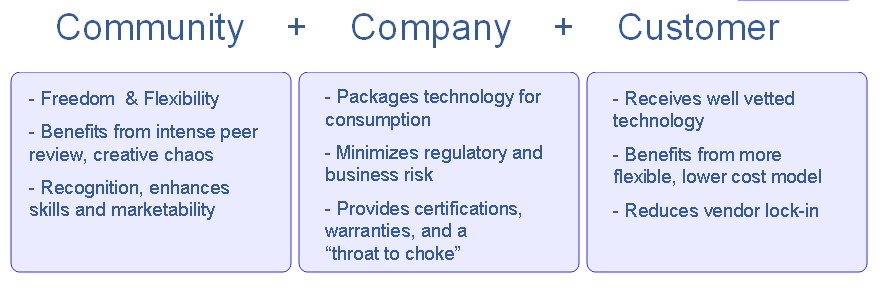
A symbiotic relationship exists in a health professional open source model between the Community, Company, and Customer.

Some people may think of open source projects as purely volunteer efforts. That is definitely not the case! While governance models vary from project to project, commercial enterprises have helped make open source consumable by ordinary people and businesses. For example, through its OpenClinica Enterprise Edition, Akaza Research provides support and regulatory assurances that help to minimize business risk and ensure success for organizations wishing to use OpenClinica in mission critical settings. Organizations can turn to Akaza to rapidly develop in-house expertise, obtain hosting and expert professional services, and ensure their OpenClinica systems and users are productive and satisfied.

A pervasive trend in software

Open source is everywhere[3]. From the Firefox web browser to the most popular websites, everyone who uses the World Wide Web uses open source. As web-based technology, OpenClinica and the OpenClinica community are direct beneficiaries of numerous other open source projects. Those within the clinical trials space who recognize the significance of open source will be a step ahead of their colleagues.

- Ben Baumann, Co-Founder, Akaza Research, LLC

Want to be an OpenClinica Community Member? Members get free access to OpenClinica software downloads, Issue Tracker, email forums, and the OpenClinica Case Report Form (CRF) Library. Register at http://www.openclinica.org/register.php.

Footnotes:
[1] See Open Source Software Definition, http://www.opensource.org/docs/osd
[2]From the Free Software Foundation: http://www.fsf.org/licensing/essays/free-sw.html
[3]The SourceForge repository of open source codebases counts over 230,000 OSS projects.

OpenClinica 3.1 (project “Amethyst”) Preview

The next major milestone for OpenClinica (project code-named “Amethyst”) will be OpenClinica version 3.1. While this release contains roughly 85 tweaks, fixes, and enhancements, this post describes some of the more significant enhancements that will be included (check out the Amethyst project roadmap page for a full list—note: openclinica.org login required).

New features in OpenClinica 3.1 will include:

  • Dynamic Items in CRFs
  • Audit Log and Discrepancy Note Data with ODM Exports
  • Assignment of Failed Validation Check Discrepancy Notes
  • Relative Paths for Item OIDs in Rules
  • Discrepancy Note Flag Colors in the CRF
  • Modularization
  • Multiple Site Level Users Allowed Access to an Event CRF
  • Simple Conditions

Dynamic Items in CRFs

OpenClinica 3.1 will support Showing and Hiding of CRF Items using both the CRF template and a Rules file. When a user enters data and saves a CRF section, data fields may be shown or hidden based on value(s) that user provided in one or more other fields on that form. This capability is also commonly referred to as “skip patterns.” A simple example would be a CRF question asking if the patient is male or female. If the value provided is female, a pregnancy related question could then be displayed to the user entering data and all questions associated with males could be hidden from view.

Audit Log and Discrepancy Note Data with ODM Exports

Audit Log data and Discrepancy Note data for a subject will be available in the ODM data extract format with OpenClinica extensions. This will allow the user to have all of the clinical data, audit log data, and discrepancy note data in a single data file.

Assignment of Failed Validation Check Discrepancy Notes

Currently, OpenClinica supports assignment and workflows around only the Query type of Discrepancy Note. OpenClinica’s “assignment” capability will be expanded to also include the Failed Validation Check type of Discrepancy Note. For Failed Validation Checks, the first note in the Discrepancy Note thread will not be assigned, but Data Managers, Study Directors and Monitors will be allowed to assign the thread to a user for review/resolution. OpenClinica will also restrict the Clinical Research Coordinators and Investigators (both site-level users) from setting the status of Failed Validation Checks to Closed.

Relative Paths for Item OIDs in Rules

A new enhancement to Rules authoring will allow the Rule creator to write one Rule Assignment for a particular CRF Item, and have the Rule execute wherever that Item’s OID is used throughout all of the study events. This increases the “portability” of rules, allowing the user to write one Rule, and have it apply multiple times rather than having to author multiple Rules and multiple Rule Assignments.

As an example, a Rule Assignment would need to contain the following path in OpenClinica 3.0.x:

SE_OBSERVAT[ALL].F_GROU.IG_GROU_GROUP_1[ALL].I_GROU_TC_ADV_PRIMARY_05

If the CRF was used in multiple events, the creator of the Rule file would have to specify the path to the other event as well.

In 3.1, all the user has to do is write:

I_GROU_TC_ADV_PRIMARY_05

and the Rules will be executed wherever that Item shows up in the study.

Discrepancy Note Flag Colors in the CRF

OpenClinica 3.1 will include additional Discrepancy Note flag colors that correspond to the various statuses of a particular thread. Currently in OpenClinica, if a Discrepancy Note thread exists, the flag will always display in a red color regardless of the Discrepancy Note status. In 3.1, the color of the flag will be reflect the “most severe” status of any thread that is on a particular item (more than one thread may exist for any item). For example, if there is a Closed thread and an Updated thread on one item, the color of the flag will be yellow representing the Updated status. If there is just a Closed thread, the color of the flag will be black. To support people who are color blind or shade blind (like myself) there will be a roll over when you put your mouse on the flag, showing you the number of threads and each of their statuses when Viewing a CRF.

Modularization & New Web Services

Modularization is defined as a software design technique that increases the extent to which software is composed from separate parts, called modules. Conceptually, modules represent a separation of concerns, and improve maintainability by enforcing logical boundaries between components.

What this means for OpenClinica is we have started to separate the application into multiple pieces. In version 3.1, we have modularized the web application from the web services functionality. This will allow new web services to be developed on separate release timelines from the main web application, facilitating the system’s extensibility.

In addition, we are release some web services with 3.1, (these were contributed by Colton Smith of Geneuity and openXdata):

  • CRF Data Import
  • Retrieve a list of studies
  • Retrieve a list of events and their CRFs
  • Retrieve a list of subjects and their events

Multiple Site Level Users Accessing an Event CRF

OpenClinica 3.1 will allow different site level users access to an Event CRF, even if they are not the conceptual “owner” of that CRF. In prior versions of OpenClinica, once a user began data entry in a CRF, the system prevented other users from adding information or data to the CRF until it had been marked complete. The new feature will allow a second user to continue entering data before the CRF is marked complete.

This change to OpenClinica will also help facilitate the ease of recording adverse events in a separate CRF. A user will not have to mark it complete in order for another user to provide additional adverse events that have occurred for a particular subject. In addition, this new functionality will prevent users from accessing an Event CRF if another user already has the form open. In this case, the second user will receive a message saying that the form is currently being accessed by another user.

Simple Conditions

In addition to the Dynamics capabilities that will be part of 3.1, we have added a feature called Simple Conditions. This feature is similar to Dynamics in many ways, but can be implemented through the CRF Template directly rather than writing a separately Rules XML document.

With Simple Conditions, a person creating an OpenClinica CRF will have the ability to designate Items as “hidden” from the data entry person’s view until a particular option is chosen for another CRF Item. The data entry person will not have to click “save” on the form–instead, as soon as the option is selected, this hidden field will be shown in real time.An example of the type of use case this feature targets, is a CRF question with two fields, one for “race” and the other for “comments” (which is hidden). If the data entry person selects the value of “other” for the race field, the hidden comments field will be display underneath.

Akaza Research is excited about bringing OpenClinica 3.1 to the community! Your comments and feedback are appreciated. Please check back in next week or so for an update on our timelines for Alphas, Betas and a Production release.

Trial Sponsors and Their Contract Labs: Better Collaboration via OpenClinica

At Geneuity Clinical Research Services, we do lab tests for trial sponsors. As readers of this blog know, we use OpenClinica internally as an LIS (laboratory information system), but as more and more drug companies and CRO’s adopt OpenClinica we foresee the day when we will be using their installations as our LIS, not ours.  A common platform will eliminate lots of duplicated effort and will allow for real-time transparency and better collaboration.  But it will also require sponsors to design their CRF’s with their contracting laboratories in mind.  In this article, we describe how this could be done.

First, consider specimen collection and tracking.  Normally, trial sponsors don’t consider doing this within the context of OpenClinica.  But they should.  Let’s say a specimen accidentally thaws in transit between the collection site and the contract lab.  Shouldn’t that fact be summarily recorded in the same context as the resulting lab test whose value may ultimately be reported to the FDA?  I should say so.

So, can OpenClinica be configured to do this? Yes and easily. A separate CRF dedicated to specimen collection could be designed and assigned to each event.  Alternatively, a specimen section could be added to already existing CRF’s.  Either way, fields for such things like accession number and specimen type could then be included.  These would be filled in by site personnel responsible for specimen collection.  Additional fields like ‘shipping deviations’ and ‘laboratory receipt date’ could also be included and would be filled in by lab personnel upon specimen delivery to the testing lab.  When it comes time for data analysis, the sponsor can use OpenClinica’s data export capabilities to exclude or include those lab results with shipping deviations and to investigate the consequences.

Other important aspects of specimen collection include printing labels to barcode samples and generating an attendant paper manifest (know as a requisition) against which labs can check incoming shipments of specimens.  OpenClinica can’t do such things currently.  It would require a whole new software module, but lots of added value could be achieved if one were written.  For instance, one can envision that after accessioning a specimen, site personnel could print a corresponding requisition from the same application window.  Also, imagine the time savings if lab personnel could conveniently print barcode labels after receiving a specimen and recording its receipt date and shipping deviations (if any).  And because the paper requisitions would be generated within the context of OpenClinica, subsequent source data verification by lab personnel could be expedited using QR-encoded URL’s that drill-down into the patient-event matrix. For more on this, see here.

Specimen tracking is just part of the story when it comes to sponsors and their contract labs.  Getting lab data from the laboratory testing platform into OpenClinica is another.  Recently during OpenClinica’s March 22 Global Conference in Bethesda, Akaza Research and Geneuity did a live demonstration of how this can be achieved using a set of MirthConnect channels. A batch of raw lab data keyed only to accession numbers was sent from Geneuity’s corporate headquarters in Maryville, TN to a remote OpenClinica installation hosted at Akaza’s Waltham, MA facility where it was inserted into the database programmatically via an awaiting web service. The insertion was streamlined, secure and seamless.  When setting up a trial, sponsors should think about the lessons this demo provides and consider distributing already configured and validated MirthConnect channels to their contract labs.  In this way, sponsors can control how their data is treated and understand every detail of its electronic provenance. And because MirthConnect can be configured to store its history, the trial’s audit trail can be extended upstream to the data’s very source.
Finally, consider invoicing.  Contract labs have to be paid when they do a test.  Monthly invoicing reports could be generated from OpenClinica by configuring an appropriate ‘data set’ and having it execute at the end of each month using the application’s new built-in quartz scheduler.  In this way, billing would be a snap and everybody would be on the same page.

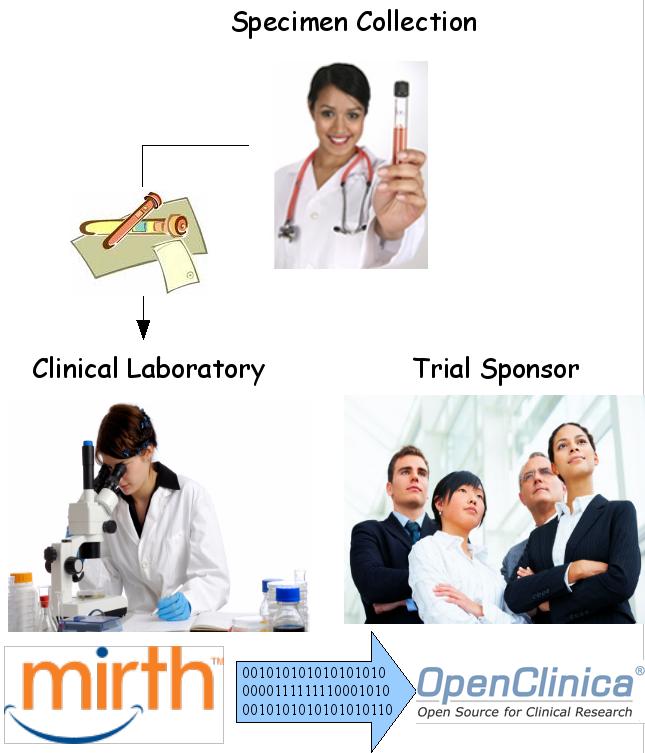
In summary, how can trial sponsors configure OpenClinica to collaborate better with their contract labs? Do the following, keeping the workflow shown in Figure 1 in mind:

1.    Include a specimen accessioning CRF for each event.  Educate your collection-site people and your lab people as to who is responsible for which fields.  Use OpenClinica’s internal messaging system to remind people of their roles when the study is actually underway.
2.    Exploit OpenClinica’s web services framework to enable batch uploads of laboratory data.
3.    Configure and validate MirthConnect channels to get the lab results from the source data files to your OpenClinica installation.
4.    Distribute these channels to your lab contractors and educate them on their use.
5.    Configure OpenClinica to automatically generate monthly data sets for billing purposes.

The bottom-line: OpenClinica is infinitely configurable and sponsors should start doing so with their lab contractors in mind.  The result will mean both better collaboration and lower costs.

Figure 1: A specimen is collected from a subject on site. The on-site data manager logs into OpenClinica and accessions the sample and prints an accompanying hard-copy requisition. The sample is then shipped to the contracting laboratory where lab personnel log into OpenClinica and indicate they have received the sample. Specimens are then tested in batch and the results are then uploaded en masse into the sponsor's installation of OpenClinica using a thoroughly vetted, validated and auditable MirthConnect channeling system.

Preview of the March 22nd OpenClinica Global Conference

With just a week to go, the OpenClinica Global Conference is shaping up to be an excellent event for learning about OpenClinica and networking with members of the OpenClinica community.

This is the first ever Global Conference and we are thrilled to have as a keynote speaker Mark Adams, Project Manager for the National Cancer Institute’s Cancer Biomedical Informatics Grid (caBIG). As a fellow pioneer working to bring open source to clinical research domain, caBIG has developed a set of interoperable, open source clinical informatics tools which address functions such as adverse event reporting, patient registries, study calendaring, clinical trial management, imaging, and tissue banking. The caBIG project and OpenClinica together illustrate the broad impact open source is having on clinical trials.

The conference program extends along three tracks with case studies, panel discussions, tutorials, and presentations from clinical trial sponsors, CROs, academic groups, and IT services companies. Content is oriented towards both technical and non-technical audiences. Selected topics include:

  • An unveiling of the new OpenClinica CRF Library, a curated repository of standards-based eCRFs for OpenClinica
  • Case studies from sponsors and CROs showing how they have used OpenClinica
  • Presentations of tools and extensions developed around OpenClinica
  • Tutorial for installing OpenClinica
  • Tools, tips, and techniques for using OpenClinica data in SAS
  • Live demonstration of automated data interchange with OpenClinica
  • Automating the data import process
  • Validating OpenClinica for 21 CFR Part 11 compliance
  • Generating ad hoc reports
  • Modularization of the OpenClinica source code and introduction to the OpenClinica Developer Network

A full suite of training classes for data managers, biostatisticans, project managers, system administrators, and developers are also being offered immediately preceding and following the conference.

There is still time to register for this event. See www.openclinicaconference.org for more program information and registration details.

We look forward to seeing you next week!

OpenClinica Community Virtual Forum

With over 8,000 members worldwide, OpenClinica is leading the charge on bringing professional quality open source software to the world of clinical trials. Many people within the OpenClinica community are interested in ways to influence the development of the electronic data capture and clinical data management system for their own purposes as well as for the greater benefit of the community. I want to briefly point out a little known, but powerful way to contribute by participating in the OpenClinica Community Virtual Forum.

The OpenClinica Community Virtual Forum is a bi-monthly web meeting of OpenClinica users who get together to provide input on new OpenClinica features and functionality and detail their experiences in working with the system. Meetings are kept small and intimate, and topics to the point. The Virtual Forum is oriented towards users of the system, not software programmers. Participants include data managers, study programmers, biostatisticians, and other users from a variety of organizations representing both the industry and academic worlds.

The exchange of ideas and feedback that has occurred in past Virtual Forums has significantly helped to refine the way functionality has been implemented and influence OpenClinica’s short and long term roadmap. In our most recent meeting last November, we discussed Dynamic Logic and received early feedback on the newly released OpenClinica 3.0.

The next Virtual Forum is scheduled for January 19th, 2010. If you would like to potentially participate in future Forum meetings, please send an email to community-forum@akazaresearch.com. For more information about the OpenClinica Virtual Forum, see https://www.openclinica.org/dokuwiki/doku.php?id=publicwiki:virtualforum:start.

OpenClinica Community and Enterprise Editions

Dear OpenClinica Community,

We are only hours away now from the general release of OpenClinica 3.0. There is a ton of excitement here at Akaza as we get ready to see many months of hard work come to fruition.

In advance of this milestone I’d like to describe a few changes we’re making to how OpenClinica is organized and how the name and logo can be used.

A brief background: As a founding member of the OpenClinica® open source community, I constantly strive to ensure that our technology has a reputation for meeting the highest standards of quality. The growth of OpenClinica® over the past few years is a testament to some success in that area. In my role as CEO at Akaza Research, a business that has invested millions of dollars into development of this open source technology, I recognize that the same reputation of quality is critical to our ongoing success. Part of how we maintain this reputation is to provide quality control over solutions that bear the OpenClinica® name. To enable this, Akaza Research owns the registered trademarks for OpenClinica® and Akaza and reserves the rights to their use.

With the release of 3.0, we are publishing a trademark policy on our website (also summarized below) that defines how the OpenClinica® and Akaza Research® trademarks may be used by members of the OpenClinica community. Our goal is to protect the quality of the OpenClinica® and Akaza brands without inhibiting the freedom that comes with the open source software model. These trademark terms complement the flexibility of open source licensing, by clarifying and creating confidence in the quality and reliability of solutions that bear the OpenClinica® name.

The most visible way the policy will be manifested is by separating the Community and Enterprise editions of the software. The default software download from OpenClinica.org is the Community Edition, pre-configured in a way that complies with the requirements of the trademark policy. The policy itself covers allowed uses of the trademarks for commercial and non-commercial purposes, both for modified (derivative) works and for unmodified versions of the software.

Akaza’s OpenClinica Enterprise customers and partners will be granted separate licenses that include additional permissions on how they may use the trademark in their marketing, operations, and services activities. Their installations will be distinguished as “OpenClinica Enterprise Edition” via the label in the footer of their OpenClinica pages.

I want to stress that 100% of the core OpenClinica source code remains free and under an open source software license. It is our promise that this will always be the case. Over time Akaza will offer additional proprietary services and technology offerings as part of the OpenClinica Enterprise Edition to complement this core, but it is our goal to ensure that the Community Edition always stands on its own as a fully-functioning, 100% open source EDC/CDMS platform.

I hope you share my view that this new policy will provide the clarity and confidence that allow OpenClinica to continue to thrive, without imposing undue restrictions on members of the community.

With that (too lengthy) introduction, here is a summary of the policy. Click here for the detailed, legal version:

Category Description Terms and Conditions
OpenClinica Community Edition You download and install the software on your own, and are not commercially supported by Akaza. You may not use the OpenClinica brand for marketing or sales purposes, and must include the community edition disclaimer.
OpenClinica Enterprise Edition You are an OpenClinica Enterprise System Level Support subscribers. Other Akaza customers/partners and OpenClinica code contributors may meet the requirements of this category. Contact sales for more detail. Includes limited use of the OpenClinica brand for marketing and sales purposes, ongoing support, and display of “OpenClinica Enterprise Edition” in footer.
OpenClinica Community Edition – Derivative Work You download and install the software on your own, make modifications to the code, and are not commercially supported by Akaza. You want to keep the OpenClinica name/logo in the modified version. You may not use the OpenClinica brand for marketing or sales purposes, and must include the community edition disclaimer.. You must also clearly state the software has been modified and the modifications are not supported by Akaza.
Other Derivative Works You choose to strip out the references to the OpenClinica and Akaza names and logos from your modified version of the software. The trademark policy does not apply. The OpenClinica source code is licensed under the GNU Lesser General Public License (LGPL). You still must follow the terms of the LGPL, including copyright attribution and requirements for redistribution of source code. Of course, if you choose to follow this course, we hope you’ll also let us know about your software modifications and will contribute these back to the core repositories, both for the benefit of the community and to help ensuring future compatibility of your flavor of the software.

If you are a community user of a prior version of OpenClinica and do not intend to upgrade to the latest release, please contact us if you have questions about how the new policy may affect you.

Best Regards,

Cal Collins

CEO, Akaza Research

Follow

Get every new post delivered to your Inbox.

Join 1,590 other followers