
• "Musings on open source and open standards in clinical trial software and healthcare IT"

  • Top Posts

  • Blog Post Categories

OpenClinica 3.1 (project “Amethyst”) Preview

The next major milestone for OpenClinica (project code-named “Amethyst”) will be OpenClinica version 3.1. While this release contains roughly 85 tweaks, fixes, and enhancements, this post describes some of the more significant enhancements that will be included (check out the Amethyst project roadmap page for a full list—note: openclinica.org login required).

New features in OpenClinica 3.1 will include:

  • Dynamic Items in CRFs
  • Audit Log and Discrepancy Note Data with ODM Exports
  • Assignment of Failed Validation Check Discrepancy Notes
  • Relative Paths for Item OIDs in Rules
  • Discrepancy Note Flag Colors in the CRF
  • Modularization
  • Multiple Site Level Users Allowed Access to an Event CRF
  • Simple Conditions

Dynamic Items in CRFs

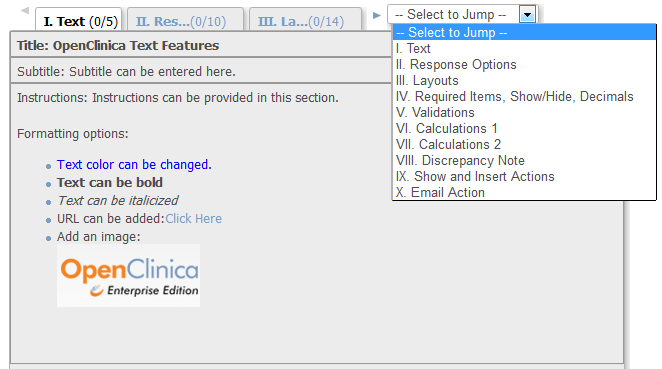
OpenClinica 3.1 will support Showing and Hiding of CRF Items using both the CRF template and a Rules file. When a user enters data and saves a CRF section, data fields may be shown or hidden based on value(s) that user provided in one or more other fields on that form. This capability is also commonly referred to as “skip patterns.” A simple example would be a CRF question asking if the patient is male or female. If the value provided is female, a pregnancy related question could then be displayed to the user entering data and all questions associated with males could be hidden from view.

Audit Log and Discrepancy Note Data with ODM Exports

Audit Log data and Discrepancy Note data for a subject will be available in the ODM data extract format with OpenClinica extensions. This will allow the user to have all of the clinical data, audit log data, and discrepancy note data in a single data file.

Assignment of Failed Validation Check Discrepancy Notes

Currently, OpenClinica supports assignment and workflows around only the Query type of Discrepancy Note. OpenClinica’s “assignment” capability will be expanded to also include the Failed Validation Check type of Discrepancy Note. For Failed Validation Checks, the first note in the Discrepancy Note thread will not be assigned, but Data Managers, Study Directors and Monitors will be allowed to assign the thread to a user for review/resolution. OpenClinica will also restrict the Clinical Research Coordinators and Investigators (both site-level users) from setting the status of Failed Validation Checks to Closed.

Relative Paths for Item OIDs in Rules

A new enhancement to Rules authoring will allow the Rule creator to write one Rule Assignment for a particular CRF Item, and have the Rule execute wherever that Item’s OID is used throughout all of the study events. This increases the “portability” of rules, allowing the user to write one Rule, and have it apply multiple times rather than having to author multiple Rules and multiple Rule Assignments.

As an example, a Rule Assignment would need to contain the following path in OpenClinica 3.0.x:

SE_OBSERVAT[ALL].F_GROU.IG_GROU_GROUP_1[ALL].I_GROU_TC_ADV_PRIMARY_05

If the CRF was used in multiple events, the creator of the Rule file would have to specify the path to the other event as well.

In 3.1, all the user has to do is write:

I_GROU_TC_ADV_PRIMARY_05

and the Rules will be executed wherever that Item shows up in the study.

Discrepancy Note Flag Colors in the CRF

OpenClinica 3.1 will include additional Discrepancy Note flag colors that correspond to the various statuses of a particular thread. Currently in OpenClinica, if a Discrepancy Note thread exists, the flag will always display in a red color regardless of the Discrepancy Note status. In 3.1, the color of the flag will be reflect the “most severe” status of any thread that is on a particular item (more than one thread may exist for any item). For example, if there is a Closed thread and an Updated thread on one item, the color of the flag will be yellow representing the Updated status. If there is just a Closed thread, the color of the flag will be black. To support people who are color blind or shade blind (like myself) there will be a roll over when you put your mouse on the flag, showing you the number of threads and each of their statuses when Viewing a CRF.

Modularization & New Web Services

Modularization is defined as a software design technique that increases the extent to which software is composed from separate parts, called modules. Conceptually, modules represent a separation of concerns, and improve maintainability by enforcing logical boundaries between components.

What this means for OpenClinica is we have started to separate the application into multiple pieces. In version 3.1, we have modularized the web application from the web services functionality. This will allow new web services to be developed on separate release timelines from the main web application, facilitating the system’s extensibility.

In addition, we are release some web services with 3.1, (these were contributed by Colton Smith of Geneuity and openXdata):

  • CRF Data Import
  • Retrieve a list of studies
  • Retrieve a list of events and their CRFs
  • Retrieve a list of subjects and their events

Multiple Site Level Users Accessing an Event CRF

OpenClinica 3.1 will allow different site level users access to an Event CRF, even if they are not the conceptual “owner” of that CRF. In prior versions of OpenClinica, once a user began data entry in a CRF, the system prevented other users from adding information or data to the CRF until it had been marked complete. The new feature will allow a second user to continue entering data before the CRF is marked complete.

This change to OpenClinica will also help facilitate the ease of recording adverse events in a separate CRF. A user will not have to mark it complete in order for another user to provide additional adverse events that have occurred for a particular subject. In addition, this new functionality will prevent users from accessing an Event CRF if another user already has the form open. In this case, the second user will receive a message saying that the form is currently being accessed by another user.

Simple Conditions

In addition to the Dynamics capabilities that will be part of 3.1, we have added a feature called Simple Conditions. This feature is similar to Dynamics in many ways, but can be implemented through the CRF Template directly rather than writing a separately Rules XML document.

With Simple Conditions, a person creating an OpenClinica CRF will have the ability to designate Items as “hidden” from the data entry person’s view until a particular option is chosen for another CRF Item. The data entry person will not have to click “save” on the form–instead, as soon as the option is selected, this hidden field will be shown in real time.An example of the type of use case this feature targets, is a CRF question with two fields, one for “race” and the other for “comments” (which is hidden). If the data entry person selects the value of “other” for the race field, the hidden comments field will be display underneath.

Akaza Research is excited about bringing OpenClinica 3.1 to the community! Your comments and feedback are appreciated. Please check back in next week or so for an update on our timelines for Alphas, Betas and a Production release.

OpenClinica 3.0 Completes Functional Testing; Enters Deployment Testing

OpenClinica 3.0 is almost here! The quality team has successfully completed functional testing and has moved onto the phase of software quality assurance called deployment testing.  Deployment tests cover 8 different target “platforms” that range from a clean installation of OpenClinica 3.0 on a Windows server using Postgres, to upgrades of OpenClinica 2.5 to 3.0 on a Linux machine using an Oracle Database. Of course, we also test on all combinations in between.

Before the production version of the application can be released, it must successfully pass through our Quality System. For those of you familiar with such a thing, all of the testing and documentation that OpenClinica 3.0 is going through will end up generating thousands of pages of “paper” that include user requirements, traceability matrix, and a large set of screenshots which prove the expected results of the test cases did in fact happen.

In addition to the team at Akaza that has invested thousands of hours testing the application, this release has also undergone road testing in our first OpenClinica Pilot Program.  I would like to warmly thank the participants of the program for committing their time and effort in making sure OpenClinica 3.0 is our most well vetted release to date.

Please look for an announcement from me in the coming days of when OpenClinica 3.0 is available for download.

- Paul Galvin, Project Manager

How Open Source EDC Can Make Clinical Trials More Productive

Barbara Zwick, from the European clinical trial Evidence and Performance Blog recently published an interview with Ben Baumann, Director of Business Development at Akaza Research. The interview discusses how open source EDC (Electronic Data Capture) clinical trials software can help enhance product time to market and overall productivity of clinical trials. Here are some excerpts from the interview:

[BZ] Today’s big Pharma R&Ds are increasing their demand for efficiency and effectiveness. How are you facing this accelerating demand for speed to market?

[BB] There are a number of ways that OpenClinica can accelerate time-to-market. First, open source software can be much easier and quicker to evaluate and get up and running than proprietary software. People can readily install it and experiment with it. Potential adopters can readily inspect everything down to the source code and directly interact with other members of the OpenClinica community to get rapid, unbiased, real-world feedback.

In addition to a full set of EDC and CDM features one might expect in such a system, OpenClinica has  built-in features that give users the ability to set-up their own studies. Therefore, an organization can get a complete picture of how well the system will work for them before committing to use it.

In short, an organization can make a rapid and highly informed decision whether or not to use OpenClinica without having to go through lengthy vendor-biased demonstrations and negotiations, and rely on a vendor in order to get their studies configured appropriately.

[BZ] How can technologies serve to clinical trial performance, to minimize costs and time to market, and to allow rapid decision making? Are innovative EDC technologies, like your platform, more performant and focused on this specific need, rather than ‘old-fashioned’ EDC Solutions?

[BB] Aside from features of the product and benefits of the open source model described above, Akaza Research’s business model for support is designed to maximize productivity of clinical trials. Our support is comprehensive and highly flexible, so customers are able to obtain support packages tailored to their needs. In addition, our customers find our support to be of extremely high quality-after all support is our primary source of revenue.

Most of our support isn’t priced “per study” so clients are able to amortize their investment over numerous studies and don’t have to go through a lengthy contracting process for each new clinical trial they want to use OpenClinica for. This can really help to minimize costs and accelerate the set-up time for new studies.

[BZ] What are the pro and cons of an open source technologies versus a classical technology in the SaaS model?

[BB] First, OpenClinica is available under both a SaaS model and local deployment. Open source has a number of benefits over “classical” proprietary EDC systems. Here are a few examples:

Reduce vendor lock-in. Numerous proprietary EDC companies have failed and gone out of business. Open source products exist and evolve independently of any particular vendor, so if one vendor ceases to exist, there are others readily available to take their place.

Improved security. Open source software is frequently more secure and bug free than proprietary software. The open source code is continuously (and often intensely) scrutinized by large community developers and security experts. As a result bugs and security issues are found and fixed usually before they become real problems.

Readily customizable. Open source systems can be readily customized and extended–you don’t need to rely on a vendor who may or may not make the software modifications you need. If the system doesn’t work the way to want it to, you can change it.

Enhanced validation. Validation can be much more thorough with open source software. Buying proprietary software is like buying a car with the  hood welded shut-you don’t know what’s really know going on behind the scenes. Open source provides the highest level of transparency making it possible to truly validate a system from end-to-end.

Validation Approach for OpenClinica

Lately there has been quite a bit of discussion in the OpenClinica community about validation. The following paragraphs provide a basic overview of the key pricipals and components of a validation approach for OpenClinica.

In 21 CFR Part 11, the FDA requires validation of all systems that store or manipulate data that will be part of a regulatory submission. However, the agency provides few hard-and-fast rules on what constitutes acceptable validation. Coming up with a validation plan without outside help can be a painful and inefficient process. Akaza Research facilitates the validation of the OpenClinica electronic data capture software by providing standardized documents that make the process of validating OpenClinica more efficient for our customers. Here’s a summary of what’s involved in validation OpenClinica, or any other computer system used in clinical trials, for that matter.

Because they are unsure what the FDA requires, sponsors tend to look for validation approaches that have been used successfully by others. Common validation practices in the industry are heavily influenced by a framework called GAMP, defined by the International Society of Pharmaceutical Engineers. (GAMP originally stood for Good Automated Manufacturing Processes, but has come to be used outside the realm of manufacturing equipment.)

A typical structure for validation under GAMP is to start with User Requirements Specifications, which drive Functional Specifications, which in turn inform the Design Specifications.  The vendor’s work has to follow the specifications and the vendor’s Systems Development Lifecycle (SDLC).

Appropriate testing must follow test scripts that map back to the requirements. The individual piece of equipment (such as an OpenClinica server) is tested with Installation Qualification (IQ) by the vendor or the customer. This is essentially acceptance testing of the hardware. The next test is Operational Qualification (OQ) of the system, carried out by the vendor or customer. Finally, the customer carries out Performance Qualification (PQ). PQ has to be related to the User Requirements Specifications.

When Akaza implements its OpenClinica Enterprise solution for a customer, we carry out the IQ and OQ testing, and provide the signed test scripts together with a detailed report on the setup and configuration of the software.

It is generally not practical for the users of off-the-shelf software to produce User Requirements Specifications and the PQ scripts themselves. For this reason, it is common for customers base their specifications and PQ scripts on documents they obtain from the vendor. Akaza’s enterprise validation package includes electronic copies of these documents, as well as a traceability matrix that ties the PQ scripts back to the requirements. The customer can modify them as needed.

The FDA expects the customer to run the PQ tests. You can probably also hire a third party to do this for you. While an experienced user can run through the OpenClinica PQ scripts in two or three days, it is reasonable to expect a novice to spend a week or so on it.

The other principal element of validation is to make sure that the software development process followed a defined SDLC (Systems Development Lifecycle). Akaza’s customers do this by auditing our procedures. At a minimum, they look at our Standard Operating Procedures, and our training records. They look at records of our internal test procedures. In addition they will sometimes look at our software defect tracking systems and source code configuration management systems.

Validation of electronic record keeping systems is a labor intensive process, but is an essential element of any submission to a regulatory body. Software vendors can make the process much more efficient for their customers. At Akaza Research, that’s one of the key things we do for users of OpenClinica to ensure they are compliant with regulations such as 21 CFR Part 11.

Validation and Compliance with Open Source Clinical Trial Software

We are often asked, “if your clinical trial software is open source, how can it be validated”? The answer is that, like with many other things open source, you have multiple options.

If you choose, you can validate the product yourself from the ground up. This involves defining your requirements, generating and executing test cases that are traceable to those requirements, and doing all this within the framework of well-defined change control and quality management systems. Since you have access to the source code, you might include design and code reviews as part of this process, especially if you are modifying the core distribution or applying patches. If your requirements are highly specialized or your implementation has been extensively customized to integrate with home-grown and legacy solutions, this might be an attractive option. Be warned however – this approach is time consuming and requires the generation of extensive documentation.

As an alternative, we offer a Validation Support Package to our OpenClinica Enterprise customers comparable to what you would expect from a proprietary software vendor. The validation support package provides access to documentation on the Akaza quality system and the OpenClinica Enterprise solution. For example, Akaza maintains a comprehensive SDLC (Software Development Lifecycle) controlled by Standard Operating Procedures, and each release undergoes comprehensive system testing and deployment testing according to a detailed test procedure and a controlled, documented testing methodology. Quality System and testing artifacts are available for auditing and inspection by customers. Customers receive access to test scripts and system requirements specifications, and may tailor these test scripts to their own needs, making them traceable to their business requirements, and executing performance qualification of their OpenClinica systems. A document specifying how OpenClinica complies with 21 CFR Part 11 requirements is included in the package as well.

At last year’s DIA Annual Meeting I hosted a panel that included two very knowledgeable colleagues on this topic, entitled “Utilizing Open Source Software in GCP-Compliant Environments”. We’re doing an updated, slightly broader version of the session at this year’s meeting in Boston in June: Utilizing Open-source Software in Clinical Research Environments. I’ll be sure to post the slides here after the meeting, and if you’re at the event please come by.

Follow

Get every new post delivered to your Inbox.

Join 1,590 other followers